

User Guide#
The main purpose of Ansys SCADE GUI Tools is to facilitate the building of forms in the SCADE IDE: dialog boxes, settings pages, or property pages. It defines a simple framework and addresses the following topics:
Building controls easily and in a consistent way
Controlling layout, especially for resizable pages
Managing the persistence of edited data
A separate component, GuiHost, allows grouping of independent property pages into a single one, with a selector. This minimizes the number of property pages in the IDE while providing consistency.
Layout#
The library promotes the construction of simple forms with the following structure:
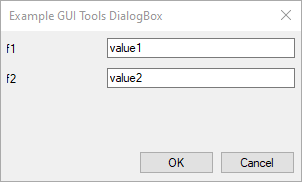
The first column contains labels and the second one contains edit areas.
The csts module provides metrics, considered as guidelines
to build consistent forms, such as:
Margins
Vertical offset for lines
Default height of controls
Controls#
The control module provides a set of controls
that comply with the framework.
The module provides several controls with the same pattern.
For example: the StaticEdit class
bundles a static control for a label and an edit control for the value and StaticComboBox has the same structure.
The FileSelector control is more complex as
it bundles an additional push button ... to call the file_open and file_save functions
from scade.tool.suite.gui.dialogs.
Dialog box#
The DialogBox class extends
the Dialog class from scade.tool.suite.gui.dialogs to provide a default
support for validation buttons, depending on the specified
DS style.
To create a dialog box, derive a class from DialogBox
and define the on_build_ex method to build
the controls.
Page#
The PropertyPageEx
(resp. SettingsPageEx) class extends
the Page class from scade.tool.suite.gui.properties
(resp. scade.tool.suite.gui.settings) to provide a default support for controls layout
and persistence.
To create a page, derive a class from PropertyPageEx
or SettingsPageEx,
and define the on_build_ex method to build
the controls. The return value of this method is detailed in the next section.
The page base classes define add_xxx methods to build controls in a simpler way.
For example, the following snippet that adds a
StaticEdit control in a dialog:
def on_build_ex(self):
    # initial position and sizes
    x = c.LEFT_MARGIN
    y = c.TOP_MARGIN
    # width of first column
    wl = 100
    # overall width: remove the margins
    w = self.right - c.LEFT_MARGIN - c.RIGHT_MARGIN
    ed_name = StaticEdit(self, "Topic name:", wl, x, y, w)
can be written as follows in the context of a property page:
# initial position
y = c.TOP_MARGIN
ed_name = self.add_static_edit(y, "Topic name:")
Persistence#
Dialog boxes are commonly used to prompt the user for command parameters. Settings and property pages aim at adding properties to a project or a model. Although these properties can be stored using a private syntax in a separate file, it is more convenient to use the means available in the SCADE environment:
Properties in a project file (ETP): these properties are usually attached to a project, but they can also apply to file or folders. They can be linked to a configuration.
Pragmas in a SCADE file (XSCADE or SCADE): these pragmas can be set to any model element that is traceable. This corresponds more or less to any model element that can be selected in the SCADE browser.
The data module provide classes for binding controls
to project properties or model element pragmas.
The DataExchange base class defines the
main binding services, specialized by derived classes for a usage
in the context of settings or property pages.
The following example illustrates the addition of two integration properties for a SCADE I/O:
def on_build_ex(self) -> IPropertiesDataExchange:
    # build the controls
    y = csts.TOP_MARGIN
    cb_topic = self.add_check_button(y, "Is topic")
    y += csts.DY
    ed_name = self.add_static_edit(y, "Topic name:")
    # persistence
    pdx = ScadePropertiesDataExchange("my_pragma_id")
    pdx.bind_control(cb_topic, name="topic", default=False)
    pdx.bind_control(ed_name, name="name", default="")

    return pdx
GuiHost#
Consider the following use case: you design two SCADE Code Generator wrappers,
one for DDS and the other one for gRPC. You might want to add integration properties
to your root operators as well as their interface elements. You can do that by creating
two custom property pages, one for each wrapper. This increases the number of tabs in the
Properties window. You may also want to introduce a single Integration page for both
wrappers. Unfortunately, this introduces a dependency between the two wrappers.
The page become difficult to maintain, for example if you want to add a third wrapper,
or if one of them is not available for all SCADE projects.
This is a perfect use case for GuiHost. This component creates dynamic property pages
depending on registered clients and displays a selector to activate a client independently
of the others.
The client page no longer implements the PropertyPage class but must derive from
GuiHostClientPage that provides
a similar interface.
Client pages do not need to register to SCADE but to GuiHost,
using package’s entry points:
module:
ansys.scade.guihostname:
pages
This entry point returns a list of client page descriptions, with the following attributes:
Mandatory
page(str): Name of the hosting property page, for example"Integration".category(str): Name of the page that is displayed in the selector, for example"DDS".class(type): Python class implementing the client page.
Optional
version(int, default0): Minimum version of SCADE required for the client page, for example24200for SCADE 2024 R2.expire(int, default999999): Latest (not included) version of SCADE required for the client page, for example25100for SCADE 2025 R1.optional(bool, defaultFalse): Whether the selector should be hidden if the hosting page contains a single client page.
Declare the following entry point in your package definition file,
for example pyproject.toml:
[project.entry-points."ansys.scade.guihost"]
pages = "my.module:pages"
That you can implement in your package’s src/my/module/__init__.py as follows:
from pages import MyDDSPage

PAGE_DDS = {
    "page": "Integration",
    "category": "DDS",
    "class": MyDDSPage,
    "version": 24200,
}


def pages() -> list:
    """Return the list of GuiHost client pages provided by this package."""
    return [PAGE_DDS]